Email Migration Services
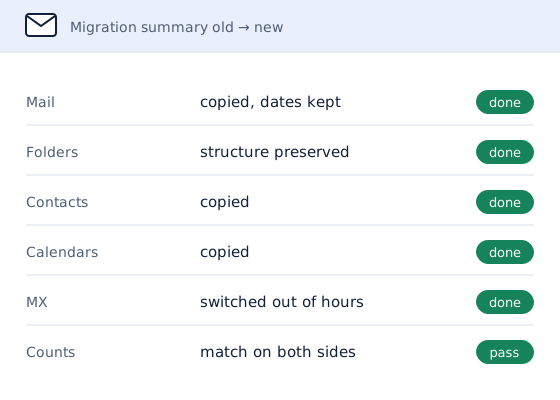
Moving your business email to a new provider? Email migration services for businesses changing provider, whether that means leaving old hosting email, moving from Microsoft 365 to Google Workspace or the other way round. Mail, folders, contacts and calendars come across with dates and read status intact, and the switchover happens outside working hours.
When a Business Needs Email Migration
- The email that came with web hosting keeps running out of space or going down.
- The company is standardizing on Google Workspace or Microsoft 365.
- A merger or rebrand means moving everyone onto a new domain.
- The current provider is closing a service or raising its prices.
In each case the risk is the same: losing messages, or losing a day of incoming mail during the switch. A planned migration avoids both.
Email Migration Routes
Microsoft 365 to Google Workspace Email Migration
Mail, contacts and calendars are copied into Gmail and Google Calendar. Outlook rules and shared mailboxes are rebuilt on the Google side, because rules and permissions do not travel with the mail.
Google Workspace to Microsoft 365 Email Migration
Gmail labels become Outlook folders, so a message with several labels can appear in more than one folder. Google Groups used as shared addresses are rebuilt as shared mailboxes or distribution lists.
Email Migration from Web Hosting
Email that came with web hosting is copied over IMAP, which carries the mail and its folders. Contacts and calendars kept on the old server are exported separately where the host allows it.
Email Migration for a New Domain Name
When a business rebrands, the old addresses are kept as aliases on the new mailboxes, so mail sent to the old domain keeps arriving while customers catch up.
Email Migration With a Security Gateway in Place
When mail passes through a gateway such as Proofpoint Essentials or Mimecast, the migration updates the gateway's delivery route to the new mailbox platform, or retires the gateway if it is no longer wanted. Either way, mail stops flowing to the old service, and the gateway is not left paid for but unused.
How Email Migration Services Move Mailboxes Safely
- Inventory. Every mailbox on the old service is listed with its size, along with shared inboxes, aliases and forwarding rules. Size matters: a mailbox bigger than the new plan allows has to be archived or moved to a larger plan first.
- Prepare the destination. Mailboxes are created on the new platform and the domain is verified there, while mail keeps flowing to the old service as normal.
- Copy the mail. Messages are copied with their folders, dates and read status. The copy can be repeated, so anything that arrives during the move is picked up in a final pass.
- Switch over. MX records are pointed at the new provider outside business hours, and SPF, DKIM and DMARC are updated to match.
- Verify and report. Message counts are compared mailbox by mailbox, and a completion report records what moved. Keeping the old account open for a month afterwards is recommended as a safety net.
Why HelpWithEmails for Email Migration
- Nothing is deleted. Mail is copied, never moved, so the old mailboxes stay complete until the business closes them.
- Counts, not assumptions. Each mailbox is checked on both sides before the migration is signed off.
- Planned around the business. The switchover time is agreed in advance and falls outside working hours.
- Deliverability carried across. Authentication records are updated as part of the move, so mail from the new platform does not start landing in spam. That is the same work covered by email deliverability services.
What an Email Migration Includes
- Mail and folders, with dates and read status
- Contacts and calendars
- Aliases, shared inboxes and forwarding rules recreated
- The DNS switchover and updated authentication records
- A completion report with per-mailbox counts
Files in OneDrive, Google Drive or SharePoint can be included when the quote lists them. Setting up the new mailboxes themselves is part of the migration; see business email setup for new addresses with no old mail to bring across.
How to Prepare for an Email Migration
A few lists made in advance make any migration smoother:
- List every mailbox and its size. The admin console or hosting control panel shows each mailbox and how much it holds.
- List the shared addresses. Note every alias, forwarder and shared inbox, such as info@ or accounts@, and who reads it.
- List the devices and apps. Phones, desktop mail apps and any tools that send email through the old service will need reconnecting.
- Agree the switchover time. Pick an evening or weekend, and tell staff when to expect the change.
Options for Email Migration
There are four common ways to change email provider:
| Option | What it involves | Best for |
|---|---|---|
| Start fresh | New mailboxes with no old mail; the history stays behind on the old service until it closes | Businesses that rarely need old messages |
| Export and import files | Each person exports to a file and imports it again; slow, and contacts or calendars are easily missed | One or two mailboxes |
| Use the provider's migration tool | Works for straightforward moves between the big platforms; the DNS switchover and records are still the customer's job | Simple moves with in-house IT |
| Hire a specialist | Inventory, copy, switchover and per-mailbox checks, with a completion report | Teams that cannot afford lost mail or downtime |
How Much Do Email Migration Services Cost?
Email migration services are quoted per job, because two moves of the same size can involve very different work. The price is set by:
- how many mailboxes are moving
- how much mail they hold
- which platforms the mail is moving from and to
- whether contacts, calendars and files are included
The quote sets out the scope and the price in writing before any work starts, and nothing is charged without it.
Email Migration Example: Microsoft 365 to Google Workspace
A UK skincare company moved its email from Microsoft 365 to Google Workspace, in a move led by Tom Ogun. Three mailboxes came across with their email, contacts and calendars, along with the team's OneDrive files. Files stored in SharePoint were outside the original scope and had become hard for the team to reach, so they were moved into a shared Google Drive folder as well. The switchover ran outside business hours, and the Microsoft 365 licenses stayed active for a month afterwards as a safety net.
Email Migration Questions
Will Emails Be Lost During an Email Migration?
No. Mail is copied rather than moved, the copy is repeated to catch anything that arrived during the move, and counts are compared on both sides before the old service is retired.
Can Migration Include Email Contacts and Calendars?
Yes. Contacts and calendars come across with the mail. Shared calendars and shared mailboxes are listed during the inventory so they are not missed.
How Long Does Email Migration Take?
It depends on the number of mailboxes and how much mail they hold. Small teams are usually moved within a week. The quote gives the timeline once the inventory is done.
Can Email Move from Microsoft 365 to Google Workspace?
Yes, and the other way round. Moves from web-hosting email, Zoho Mail and other IMAP providers are handled the same way.
Is There Downtime When Changing Email Provider?
Mail keeps arriving throughout. During the switchover some messages may reach the old mailbox for a few hours while DNS updates, which is why a final copy runs after the switch.
Request an Email Migration Quote
List the current provider, the new one if it is chosen, and roughly how many mailboxes are moving.
A written quote comes back by email, with the scope and the price set out before any work starts.