Email Marketing Services
Sending newsletters that customers never seem to see? Email marketing services for businesses that want newsletters and offers to reach customers' inboxes. HelpWithEmails sets up the marketing platform properly on the business domain, imports and cleans the customer list, then builds and sends the first campaign or welcome sequence with delivery checked.
Who Email Marketing Setup Helps
- Businesses starting a newsletter for the first time.
- Teams whose campaigns land in spam or the Promotions tab and rarely get opened.
- Companies switching from one marketing platform to another.
- Businesses whose customer list is scattered across spreadsheets and old systems.
Email Marketing Platforms Set Up
Mailchimp Email Marketing Setup
Mailchimp suits straightforward newsletters. Setup authenticates the business's domain inside Mailchimp, so campaigns are signed with the business's own domain rather than Mailchimp's.
Klaviyo Email Marketing Setup
Klaviyo suits online stores, with emails triggered by browsing and purchases. Setup adds a branded sending domain, so the store's emails build the store's own reputation.
Brevo Email Marketing Setup
Brevo suits businesses that send newsletters and transactional mail, such as order confirmations, from one platform. Setup authenticates the domain for both kinds of mail.
MailerLite Email Marketing Setup
MailerLite suits small lists and simple automations. Setup authenticates the domain and connects the sign-up forms on the website.
How Email Marketing Services Get Campaigns to the Inbox
- Choose or review the platform. Mailchimp, Klaviyo, Brevo and MailerLite all suit small businesses. The platform already in use is kept if it fits.
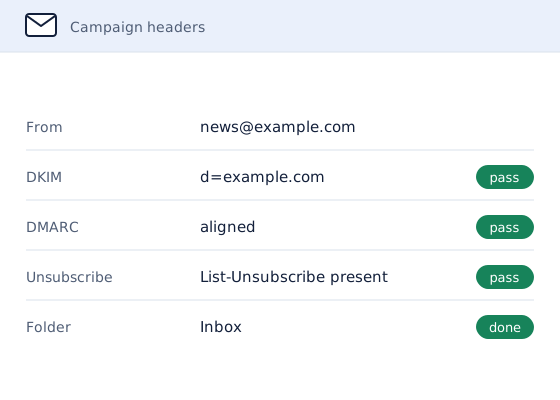
- Authenticate the sending domain. Campaigns go out from the business's own domain with SPF, DKIM and DMARC aligned, instead of the platform's shared default.
- Import and clean the list. Contacts are imported with their consent status. Invalid addresses, duplicates and people who unsubscribed are removed before the first send.
- Build the first campaign. The first newsletter or a welcome sequence is built in the platform from the business's own content, with a working unsubscribe link and the postal address that the law requires in the footer.
- Warm up the sending domain. Before the first real send, daily volume from the domain is raised in stages to twice the planned send, so the first campaign goes out from a domain with reputation behind it. See email warmup services for how the ramp works.
- Send and check delivery. Test sends are checked in Gmail and Outlook before the real send goes out to the list.
- Monitoring and reporting. After the send, inbox placement, bounces, complaints and unsubscribes are monitored, and a written report shows the results and what to adjust for the next campaign.
Why HelpWithEmails for Email Marketing
- Delivery comes first. A campaign only works if it arrives, so the setup starts with the domain and the list, the parts most often skipped.
- Built to be run in-house. Templates, lists and settings are documented, so the team can send the next campaigns without outside help.
- A clean list protects the domain. Removing bad addresses before the first send keeps bounces and complaints low from the start.
What Email Marketing Setup Includes
- Platform selection or review
- Sending-domain authentication with SPF, DKIM and DMARC
- List import, cleaning and consent check
- The first campaign or welcome sequence, built and tested
- Warmup of the sending domain before the first send
- Delivery checks before the first send
- Monitoring and a written report after the first send
Writing campaigns every month and running a campaign calendar are not included; the setup is built so the team can send the next campaigns itself. Warmup runs as part of the setup; email warmup services explains how the ramp works.
How to Check an Email Marketing Setup Yourself
One test campaign shows most problems:
- Send a test to Gmail. Use a personal Gmail address and see whether it lands in Primary, Promotions or Spam.
- Check the signature. In Gmail, "Show original" should show DKIM passing with the business's own domain, not the platform's.
- Check the footer. The unsubscribe link should work, and the business's postal address should be there.
- Check the list. Bounced and unsubscribed contacts should be suppressed, not mailed again.
Options for Email Marketing Setup
There are four ways to get a marketing platform sending:
| Option | What it involves | Best for |
|---|---|---|
| Use the platform defaults | Campaigns go out from the platform's shared domain, which customers' mail servers trust less | Testing a platform |
| Follow the platform's guides | Domain authentication and list import done in-house, one guide at a time | Someone comfortable editing DNS |
| Agency retainer | An agency writes and sends campaigns every month; more than setup, and an ongoing cost | Businesses with no time to write |
| Specialist setup | Domain, list, warmup and first campaign done properly, monitored, then run in-house | Teams that will write their own campaigns |
How Much Do Email Marketing Services Cost?
Email marketing setup is quoted per job. The platform's own subscription depends on list size and is separate from the setup work, which is priced by:
- how large the list is and how clean it is
- whether the business is moving from another platform
- whether the first send is a single campaign or a welcome sequence
- how long the warmup ramp needs to run before the first send
The quote sets out the scope and the price in writing before any work starts, and nothing is charged without it.
Email Marketing Questions
Which Email Marketing Platform Is Best for a Small Business?
Mailchimp and MailerLite suit simple newsletters, Klaviyo suits online stores that want sales-driven automation, and Brevo suits businesses that also send transactional mail. The recommendation follows what the business sells and how often it plans to send.
Why Do Marketing Emails Go to Spam?
The usual reasons are campaigns sent from the platform's shared domain instead of the business's own, missing authentication, and old lists full of invalid addresses. Setup fixes all three before the first send.
Can an Existing Customer List Be Used?
Yes, for contacts who agreed to hear from the business. Their consent status is imported with them, and bought or scraped lists are not used.
Does Email Marketing Setup Include Writing the Campaigns?
The first campaign or welcome sequence is built from the business's own content. Writing campaigns every month is not included.
Request an Email Marketing Quote
Say which platform is in use, if any, how big the list is and what the first campaign should be.
A written quote comes back by email, with the scope and the price set out before any work starts.