Email Audit Services
Something wrong with your email, but nobody can say what? Email audit services for businesses that know something is wrong with their email but not what. The audit checks the domain the way Gmail and Microsoft do, then sets out each finding with the evidence behind it and what to do about it, in order of urgency.
Who Needs an Email Audit
- Businesses whose mail goes to spam, where nobody knows why.
- Teams about to launch a campaign or connect a new sending tool.
- Companies where the person or IT provider who set up email has left, and nobody knows what is configured.
- Businesses whose domain was used in a phishing or spoofing attempt.
- Buyers taking over a domain as part of an acquisition.
Email Audit Types
Email Deliverability Audit
Focused on why mail lands in spam: inbox placement, reputation, blocklists and authentication. It suits businesses whose customers say they are not receiving messages.
Email Security Audit
Focused on who can send email as the business: which services are authorized, how strict the DMARC policy is and whether the domain can be spoofed. Where a security gateway such as Proofpoint, Mimecast or Barracuda sits in front of the mailboxes, the audit checks that mail cannot bypass it. It suits businesses that have seen fake emails sent in their name.
Email Audit Before a Campaign
Checks the sending domain, the marketing platform's authentication and whether warmup is needed before volume goes out, because a first campaign sent from an unprepared domain can damage its reputation for months.
Email Audit After a Staff or IT Change
Documents what is configured, who has access to the DNS and which services send mail, so nothing depends on one person's memory.
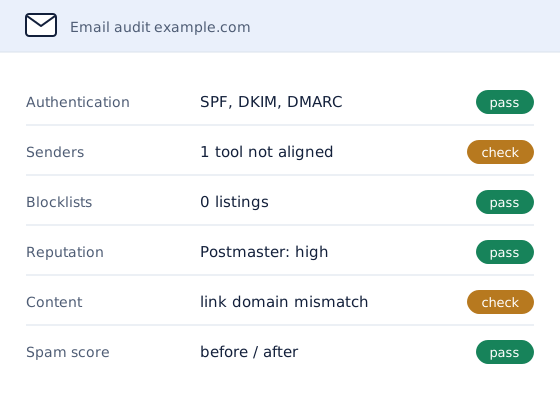
How an Email Audit Checks a Domain
- Spam-score and inbox tests. Messages from the domain's real mailboxes are scored and sent to Gmail and Outlook test accounts.
- Authentication. SPF, DKIM and DMARC are read, validated and tested against real messages.
- Senders. Every service sending as the domain is found, and each one is checked for alignment with the domain.
- Platform settings. The mailbox platform's settings that affect delivery and security are reviewed.
- Blocklists and reputation. The domain and its sending servers are checked across the major blocklists and reputation tools.
- Content and headers. Sample messages are reviewed for the things spam filters penalize.
The report sorts every finding by urgency: fix now, fix this month, and worth doing later.
Why HelpWithEmails for an Email Audit
- Every claim has evidence. Each finding links to the result that produced it, from MXToolbox, Mail-Tester, dmarcian, Google Postmaster Tools and blocklist lookups.
- The main fix is done, not left as homework. SPF, DKIM and DMARC are corrected as part of the audit.
- Actionable by anyone. Each remaining finding names the exact record or setting involved, so an in-house team or IT provider can act on it directly.
What the Email Audit Report Includes
- Spam-score and inbox test results, before and after the authentication fix
- SPF, DKIM and DMARC findings, with the fix applied
- A list of every service sending as the domain and whether it aligns
- Blocklist and reputation results
- Content and header findings
- An action plan sorted by urgency
Findings beyond authentication are advice unless the quote includes fixing them. When the audit uncovers a deeper problem, email deliverability services pick up from the report.
How to Run a Basic Email Audit Yourself
Free tools cover the first layer of an audit:
- List every sender. Write down every tool that sends email as the domain: mailboxes, website forms, invoicing, the CRM and newsletters.
- Look up the records. MXToolbox's SPF, DKIM and DMARC lookups show what is published, and whether each record is valid.
- Check the blocklists. MXToolbox's blacklist check covers the major lists.
- Test a real message. Mail-Tester scores a message sent from the domain and lists what it found.
What free tools cannot show is whether each sender on the list actually passes, which is where most audits find their problems.
Options for an Email Audit
There are four ways to find out what is wrong with a domain's email:
| Option | What it involves | Best for |
|---|---|---|
| Skip the audit | Problems stay hidden until customers report missing messages | Nobody sending important mail |
| Free online checkers | Records and blocklists checked, but not which tools send as the domain or what to fix first | A quick first look |
| Ask the IT provider | General IT support may check the mailbox platform, but rarely every sender and reputation source | Businesses with email-savvy IT |
| Specialist audit | Every sender, record, listing and setting checked, with evidence and an action plan | Businesses that need a clear answer |
How Much Does an Email Audit Cost?
An email audit is quoted per domain, because the work grows with the number of senders and findings. The price is set by:
- how many domains are audited
- how many services send email as each domain
- whether fixes beyond authentication are included
The quote sets out the scope and the price in writing before any work starts, and nothing is charged without it.
Email Audit Questions
What Does an Email Audit Check?
Authentication records, every service sending as the domain, the mailbox platform's settings, blocklists and reputation, and the content and headers of real messages.
How Is an Audit of Email Different From a Deliverability Fix?
An audit finds and documents every problem, and fixes the authentication records. A deliverability fix goes further on a known problem, such as clearing blocklist listings and retesting until mail reaches the inbox.
What Access Does an Email Audit Need?
Access to the domain's DNS settings to apply the authentication fix, and test messages sent from each mailbox or tool that sends as the domain.
How Long Does an Email Audit Take?
Most audits are delivered within a few working days. The quote confirms the timeline.
Can an IT Provider Use the Report?
Yes. Each finding names the exact record or setting involved, with the evidence attached, so it can be handed straight to whoever manages the systems.
Request an Email Audit Quote
Name the domain and describe what prompted the audit.
A written quote comes back by email, with the scope and the price set out before any work starts.