BUSINESS EMAIL SUPPORT

Help With Emails

Help With Emails traces the route between your business, your sending tools and the inbox. We fix spam placement, broken authentication, mailbox problems and unsafe migrations. Every job ends with a written report showing what changed.

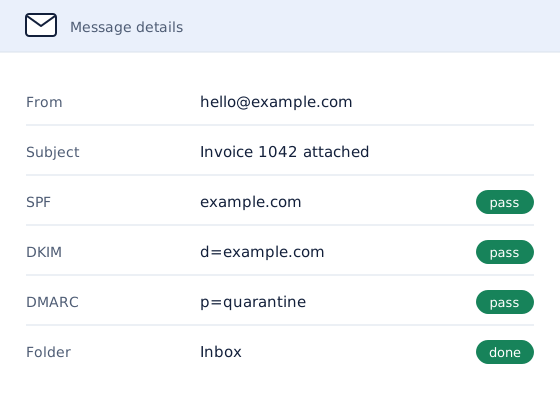
A business email delivered to the inbox with SPF, DKIM and DMARC checks passing
Delivery checked Business email that arrives, signed and authenticated.

Get Help With Emails

Describe what is happening and which domain is involved.

A written quote comes back by email, with the scope and the price set out before any work starts.

Prefer to talk it through? Book a call.

Why Business Emails Go to Spam

Mailbox providers such as Gmail, Outlook and Yahoo decide where a message lands before anyone reads it. They check whether the domain has authorized the server that sent it, whether the message was signed, and how that domain and server have behaved before. A business email that fails those checks goes to spam however ordinary its content is. Almost every case traces back to one of the causes below.

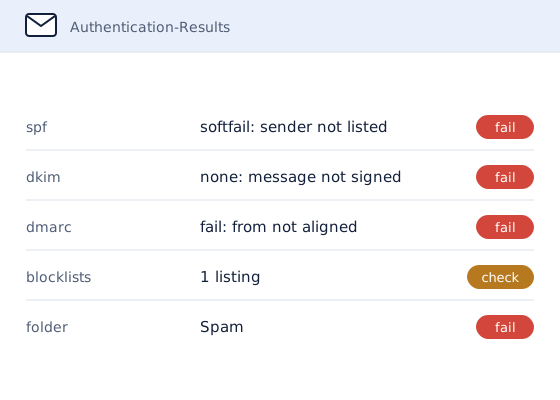
Email headers showing SPF soft-failing, no DKIM signature, DMARC failing and a blocklist listing, with the message filed in spam
The headers show where authentication failed before the message reached spam.

Missing or Broken SPF, DKIM and DMARC Records

SPF lists the servers allowed to send as the domain, DKIM signs each message, and DMARC tells receivers what to do when both fail. A record with a typo, two SPF records on one domain or an SPF record past its ten-lookup limit breaks authentication as surely as having none. The SPF, DKIM and DMARC setup guide explains each record.

Website and Invoicing Tools Sending Email Without Authorization

Website contact forms, invoicing software, CRMs and booking systems often send as the business without being added to its SPF record or given a DKIM key. A tool can show the business address in the visible From field while using a different envelope sender or DKIM signing identity behind it. When the From domain, envelope sender and signing identity do not align, DMARC can fail even though the message looks genuine. This is why invoices or website enquiries can land in spam while ordinary mailbox replies arrive.

How Blocklists and Poor Sender Reputation Send Email to Spam

A compromised mailbox, a purchased list or a shared server used by another sender can put a domain or IP address on a blocklist such as Spamhaus. Providers also track complaints and bounces, and a domain that collects too many loses trust across every message it sends.

New Domains Sending Too Much Too Soon

A domain with no sending history has no reputation to rely on. Sending a full campaign from it in the first week looks like spam to the filters, so new domains need a gradual warmup before they send at volume.

Gmail, Yahoo and Microsoft Bulk Sender Rules

Since 2024 Gmail and Yahoo, and since 2025 Microsoft's Outlook.com, have required anyone sending in bulk to pass SPF, DKIM and DMARC, and Gmail and Yahoo also require one-click unsubscribe and a low spam complaint rate. Mail that falls short is filtered or rejected. When the cause is unclear, email deliverability services find which of these applies and fix it.

Email Content, Attachments and Signatures Triggering Spam Filters

Mailbox providers inspect the message text, links, attachments and HTML added by an email signature. Link shorteners, mismatched link domains, image-only messages, executable files, password-protected archives and unusually large attachments can increase the risk. A signature filled with tracking links, remote images or copied formatting can also change how the message is scored. Content is rarely the only cause, so it should be checked alongside authentication and sender reputation.
How Getting Help With Emails Works

  1. Describe the problem. The quote form asks for the domain and what is happening, in plain words.
  2. Get a written quote. The scope, the timeline and the price are set out before any work starts.
  3. Work done, report delivered. Every job ends with a report showing what was found, what changed and the evidence that it worked.

Why Businesses Get Help With Emails Here

  • Email is the whole job. Help With Emails does business email and nothing else: delivery, setup, migration and the records that hold it together.
  • Evidence in every report. Findings link to the test results behind them, from tools such as Google Postmaster Tools and MXToolbox.
  • Plain English. Reports explain what each change does, so the business understands its own setup.
  • Inbox placement, promised and tested. After a fix, test messages go to the mailbox providers named in the quote, and the work continues at no charge until they land in the inbox.

Email Guides From Help With Emails

Step-by-step guides for businesses that want to fix or improve their own email first. See all email guides and tips.

Questions About Help With Emails

What Is Help With Emails?

Help With Emails is an email services business for companies that rely on email to sell and serve customers, working on business email since 2023. helpwithemails.com is the dedicated website of its email marketing and email deliverability service arm (when it started and who runs it). It sets up, moves, audits and repairs business email, because email problems usually cost sales long before anyone traces them back to a setting.

What Does Help With Emails Fix?

Help With Emails fixes emails going to spam, sets up business mailboxes, runs moves between providers, warms up new domains and sets up marketing platforms on the business domain. When the cause of a problem is unclear, an email audit finds it first.

How Is Help With Emails Different From an IT Provider?

An IT provider looks after every system a business runs, while Help With Emails works only on email. That focus matters because deliverability problems sit across DNS, sending tools and mailbox providers, and they take email-specific tools and experience to trace. Findings are backed by test results from tools such as Google Postmaster Tools and MXToolbox, so an IT provider can act on the report too.

How Is Help With Emails Different From the Email Provider's Support?

Google, Microsoft and web hosts support their own platform, not the other services that send as the business. Help With Emails checks everything that sends email as the domain, including website forms, invoicing tools and marketing platforms, because that is where many spam and spoofing problems start. After a fix, test messages go to the mailbox providers named in the quote to prove the result.

Which Email Platforms Does Help With Emails Work With?

Google Workspace, Microsoft 365, Zoho Mail and the email that comes with most web hosting, plus marketing platforms such as Mailchimp, Klaviyo, Brevo and MailerLite, and email security gateways such as Proofpoint, Mimecast and Barracuda. Personal Gmail and Outlook.com accounts are outside the service, because the work depends on access to a business domain.

Where Does Help With Emails Work?

Help With Emails has offices in the United States, in Sheridan, Wyoming, and in the United Kingdom, in London, and works with businesses anywhere. Email work needs access to the domain's DNS and the mailbox platform, not a site visit, so quotes, changes and reports are all handled remotely, by email or on a call.

How Is Email Help Priced?

Every job is quoted in writing before work starts, because the work depends on the domain, the number of mailboxes and what needs doing. The quote form asks for the domain and what is happening, and the written quote sets out the scope, the timeline and the price. Nothing is charged without an agreed quote.