Business Email Setup
Still sending business email from a free Gmail or Hotmail address? Business email setup for companies that want addresses like name@company.com instead of a free Gmail or Hotmail account. HelpWithEmails creates the mailboxes, connects them to the domain, secures them and tests every one before handing over.
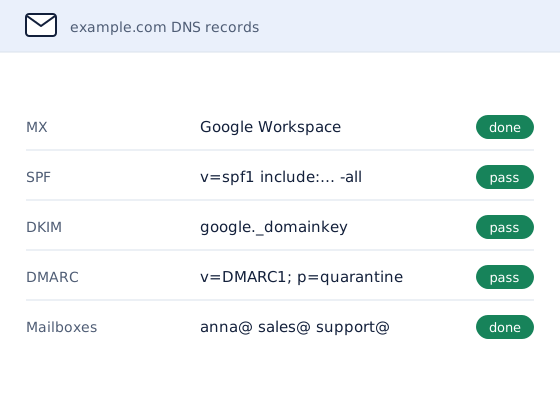
Who Business Email Setup Is For
- New businesses with a new domain and no email on it yet.
- Teams still sending from free addresses that customers do not recognize.
- Companies that bought a domain and a website but never connected email to it.
- Businesses that have outgrown the basic email that came with their web hosting.
An address on the company's own domain looks established, stays with the business when staff change, and can be protected with the same records that stop other people sending email as the business.
Business Email Setup by Platform
Google Workspace Email Setup
Google Workspace suits teams that prefer Gmail, Google Drive and Meet. Setup verifies the domain with Google, creates the users and publishes Google's MX and DKIM records, so mail is signed from the first message.
Microsoft 365 Email Setup
Microsoft 365 suits teams that work in Outlook, Word, Excel and Teams. Setup verifies the domain, assigns licenses and publishes Microsoft's records, including DKIM, which Microsoft leaves switched off for custom domains until someone turns it on.
Email Setup on Zoho Mail
Zoho Mail is a lower-cost option for businesses that need email without a full office suite. Setup follows the same pattern: domain verification, mailboxes, then MX, SPF, DKIM and DMARC.
Shared Inboxes and Aliases
Addresses such as info@, sales@ and support@ can be shared mailboxes or aliases that deliver to one person. The right choice depends on whether several people answer them, because a shared mailbox keeps one record of every reply.
Email Setup With a Security Gateway
Businesses that want stronger filtering than their mailbox platform provides can put a security gateway, such as Mimecast, Proofpoint Essentials or Barracuda, in front of Microsoft 365 or Google Workspace. HelpWithEmails does not sell gateway subscriptions: the business buys its own from the provider, and HelpWithEmails sets it up and enforces it. Setup points the MX records at the gateway, connects it to the mailbox platform, restricts the platform so mail can only arrive through the gateway, and adds the gateway to SPF where it also sends outbound mail.
How the Email Setup Process Works
- Choose the platform. Google Workspace, Microsoft 365 and Zoho Mail all work well. The right one depends on the apps the team already uses and the budget, and the quote recommends one and says why.
- Confirm domain access. Setup needs access to the domain's DNS settings. A business without a domain yet can have one registered in its own name.
- Connect the domain. MX records route incoming mail to the new mailboxes, and SPF, DKIM and DMARC are published straight away, so new addresses start with a clean reputation.
- Create and test the mailboxes. Each address is created, aliases and shared inboxes are added, and test messages are sent and received in both directions.
- Hand over. A handover report lists every address, where to sign in and which records were added to the domain.
Why HelpWithEmails for Business Email Setup
- Secure from the first day. Authentication records go in during setup, not after the first spam complaint.
- One contact for the whole job. Domain, DNS, mailboxes and testing are handled together, so nothing falls between two providers.
- A written record. The handover report means the next person who touches the setup knows exactly what is there.
The same records that make setup secure are what keep mail out of spam later, which is why setup is done by people who spend their days on email deliverability.
What Business Email Setup Includes
- A platform recommendation based on how the team works
- Mailboxes, aliases and shared addresses created
- MX, SPF, DKIM and DMARC records published and validated
- Send and receive tests for every address
- A handover report with sign-in details and a record of every change
Platform subscriptions are listed separately in the quote. Connecting phones and desktop mail apps can be added as a remote session. Bringing old messages across from a previous provider is email migration, quoted on its own.
How to Check an Email Setup Yourself
A new setup can be checked in a few minutes:
- Send both ways. Send a message from the new address to a Gmail and an Outlook address, and reply to it.
- Check where mail is routed. MXToolbox's MX lookup should show the chosen provider's servers and nothing left over from an old host.
- Check the security records. MXToolbox's SPF, DKIM and DMARC lookups should each return a record.
- Read the headers. In Gmail, "Show original" on the test message should show SPF, DKIM and DMARC all passing.
Options for Business Email Setup
Businesses usually choose one of four routes:
| Option | What it involves | Best for |
|---|---|---|
| Keep a free address | Gmail or Hotmail addresses cost nothing, but customers trust them less and they leave with the person who owns them | Sole traders just starting out |
| Use the setup wizard | The platform's own wizard creates mailboxes, but the DNS records are left to the customer to add correctly | Someone comfortable editing DNS |
| Use the web host's email | Basic mailboxes bundled with hosting, often with small storage limits and fewer security options | Very small, low-volume use |
| Hire a specialist | Platform advice, every record published, every mailbox tested and a written handover | Teams that want it done once and done right |
How Much Does Business Email Setup Cost?
Business email setup has two parts: the platform subscription for each user, and the one-off setup work. The setup price depends on:
- how many addresses and shared inboxes are needed
- whether the domain already exists and who manages its DNS
- which platform is chosen
- whether phones and desktop apps need connecting
The quote lists the subscriptions and the setup work separately, in writing, before any work starts.
Business Email Setup Questions
What Is the Best Business Email for a Small Company?
For most small companies it is Google Workspace or Microsoft 365. Teams that live in Word, Excel and Teams usually suit Microsoft 365; teams that prefer Gmail, Docs and browser-based tools usually suit Google Workspace. Zoho Mail is a lower-cost option for email on its own.
Can Email Setup Use an Existing Domain?
Yes. The domain stays where it is registered, and only the email records change. The website is not moved or touched.
How Long Does Business Email Setup Take?
Usually a few working days from receiving DNS access. DNS changes can take a few hours to reach every network, so new addresses are tested before they are handed over.
Does Setup Include Email Security Records?
Yes. SPF, DKIM and DMARC are part of every setup. They prove to other mail servers that messages really come from the business, which protects both deliverability and the business's name.
Will the Website Be Affected by Email Setup?
No. Email and the website use different DNS records. The records for the website are left exactly as they are.
Request a Business Email Setup Quote
Say how many addresses are needed, which domain they go on and whether a platform is already chosen.
A written quote comes back by email, with the scope and the price set out before any work starts.