Email Deliverability Services
Are customers finding your emails in their spam folder? Email deliverability services for businesses whose emails keep landing in spam or junk folders, or never arrive at all. HelpWithEmails finds the cause, fixes the records and settings behind it, and shows the before-and-after test results, so the fix is proved, not just promised.
Signs a Business Needs Email Deliverability Help
Most deliverability problems show up as a customer complaint long before anyone checks a setting:
- Customers find invoices, quotes or password resets in their spam folder.
- Replies stop coming from people who always used to answer.
- Gmail shows a warning banner on messages, or Outlook files them under Junk.
- Bounce messages mention SPF, DKIM, DMARC, a "policy" or a blocklist.
- A new website form, CRM or booking tool started sending email as the business.
Behind almost all of these is one of three causes: the domain's authentication records are missing or wrong, a service sending on the business's behalf is not authorized, or the domain or its sending server is on a blocklist. All three can be found, and all three can be fixed.
Email Deliverability Problems Fixed
Emails Going to Junk in Outlook
Microsoft filters heavily on authentication and sender reputation, so a domain with a weak or missing DMARC record often lands in Junk at Outlook and Hotmail addresses while Gmail looks fine. The fix starts with the records, because Microsoft will not trust a domain that cannot prove its mail is genuine.
Gmail Sending Emails to Spam
Gmail expects SPF or DKIM from every sender and DMARC from anyone sending in bulk, and it weighs how recipients react. Google Postmaster Tools shows how Gmail rates the domain, so that is checked before anything is changed.
Domain or Server on a Blocklist
A listing on Spamhaus or another major blocklist can stop mail outright. Each listing is traced to its cause before removal is requested, because a listing removed without fixing the cause comes back.
Spoofed Emails Sent in the Business's Name
When someone sends email pretending to be the business, a DMARC policy tells other mail servers to reject it. Moving DMARC to enforcement safely means first making sure every legitimate sender passes, because a strict policy set too early blocks the business's own mail.
Email Deliverability to Proofpoint, Mimecast and Barracuda
Many larger companies screen incoming mail through a security gateway such as Proofpoint, Mimecast or Barracuda, or through Microsoft Defender for Office 365. These filters keep their own reputation data and quarantine rules, so mail can reach Gmail and Outlook.com inboxes and still disappear on its way into a corporate customer. The fix starts with the same authentication and reputation work, then tests delivery into the gateways the business's customers use. Those gateways can be named in the quote's placement test, and the work continues at no charge until mail passes them.
How Email Deliverability Services Fix Emails Going to Spam
- Access and inventory. Work starts with access to the domain's DNS settings and the name of the email provider. Then every service that sends email as the domain is listed: the mailboxes, the website, invoicing, the CRM and any marketing tools.
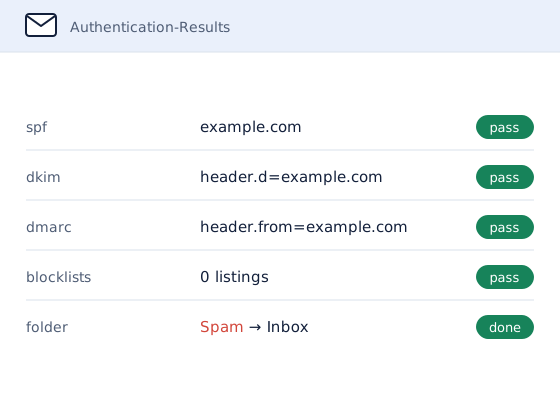
- Baseline tests. Test messages go to Gmail, Outlook and a spam-scoring tool, and the domain and its sending servers are checked against the major blocklists. This is the "before" picture.
- Authentication fixed. SPF, DKIM and DMARC are corrected or published, so every legitimate sender is authorized and signed, and nobody else can pass as the business.
- Blocks cleared. Each blocklist listing is traced to its cause, and removal is requested once the cause is gone. Settings that trip spam filters, such as a sender name that does not match the domain, are flagged.
- Retest and report. The same tests run again. A written report shows each problem found, what changed and the result, with the test evidence attached.
For businesses that send regularly, ongoing monitoring is available: DMARC reports are reviewed each month, and problems are raised before customers notice them.
Why HelpWithEmails for Email Deliverability
HelpWithEmails works on one thing: business email. Deliverability is the problem most clients arrive with, so it is where most of the experience sits.
- Evidence, not opinion. Every finding in the report links to the test that produced it, from Google Postmaster Tools, MXToolbox, Mail-Tester and blocklist lookups.
- Plain English. The report explains what each record does and why it changed, so the business understands its own setup.
- Ready for the next tool. When a new service starts sending as the domain later, the report shows exactly where it needs to be added.
- Inbox placement, promised with terms. After the fix, test messages go to the mailbox providers named in the quote, such as Gmail, Outlook and the security gateways the business's customers use. If a test lands outside the inbox, the work continues at no charge until it passes.
What an Email Deliverability Fix Includes
- A review of every service sending email as the domain
- SPF, DKIM and DMARC corrected, published and validated
- Blocklist checks for the domain and its sending servers, with removal requests where needed
- Spam-score and inbox tests before and after the fix
- An inbox-placement test after the fix, with work continuing at no charge until it passes
- A written report with the evidence for each finding
Advanced records such as MTA-STS, TLS reporting and BIMI are assessed and recommended where they help, and set up only when the quote includes them. Not sure deliverability is the problem? An email audit checks everything first and says what needs fixing.
How to Check Email Deliverability Yourself
A first check takes about ten minutes with free tools:
- Look up the records. Enter the domain in MXToolbox's SPF, DKIM and DMARC lookups. A missing DMARC record, or an SPF record that needs more than ten DNS lookups, is a common cause of spam placement.
- Score a real message. Send an ordinary email to the address Mail-Tester gives, then read the score and the problems it lists.
- Check the blocklists. MXToolbox's blacklist check shows whether the domain or its sending server is listed.
- Read the headers. In Gmail, "Show original" on any message from the domain displays its SPF, DKIM and DMARC results.
If every check passes and mail still lands in spam, the cause is usually reputation or content, which takes longer to pin down. That is what an email audit is for.
Options for Fixing Email Deliverability
There are four realistic ways to deal with emails going to spam:
| Option | What it involves | Best for |
|---|---|---|
| Leave it | Customers keep missing messages, and blocklist listings and spoofing usually get worse rather than better | Nobody, once customers notice |
| Fix it yourself | Publishing DNS records and reading test results, using the checks above | Someone comfortable editing DNS |
| Ask the email provider | Google, Microsoft or the web host checks its own platform, but not the other services sending as the domain | Problems inside one platform |
| Hire a specialist | Every sender, record and listing checked and fixed, with before-and-after evidence | Businesses that need it fixed and proved |
How Much Do Email Deliverability Services Cost?
Email deliverability services are quoted per job, because the work depends on the domain rather than a fixed package. The price is set by:
- how many services send email as the domain
- whether the domain or its servers are on blocklists
- how many domains are involved
- whether ongoing monitoring is wanted after the fix
The quote sets out the scope and the price in writing before any work starts, and nothing is charged without it.
Email Deliverability Questions
What Is Email Deliverability?
Email deliverability is whether a message reaches the inbox, rather than the spam folder or nowhere at all. It depends on the domain's authentication records, the reputation of the domain and its sending servers, and how recipients respond to the mail they get.
Why Are Emails Going to Spam?
The usual causes are missing or incorrect SPF, DKIM or DMARC records, a service sending on the business's behalf without being authorized, a blocklist listing, or a sudden jump in volume from a domain that rarely sent before. A deliverability check finds which one applies.
How Long Does an Email Deliverability Fix Take?
Most fixes are finished within a few working days of receiving DNS access. Blocklist removals depend on the list operator. The quote sets out the expected timeline before any work starts.
Is Email Inbox Deliverability Guaranteed?
Yes, on stated terms. The quote names the mailbox providers the placement test covers, and the test runs after the fix. If mail lands outside the inbox in that test, the work continues at no charge until it passes. Placement can change later if sending habits, content or list quality change, which is why ongoing monitoring is available for businesses that send regularly.
Does Fixing Deliverability Mean Changing Email Provider?
Almost never. Deliverability problems usually sit in the domain's records and sending setup, not in the mailbox provider. If a move would genuinely help, the report explains why, and email migration is available separately.
Request an Email Deliverability Quote
Describe what is happening and which domain is affected.
A written quote comes back by email, with the scope and the price set out before any work starts.