Microsoft 365 to Google Workspace Migration
Moving the business from Microsoft 365 to Google Workspace? Microsoft 365 to Google Workspace migration moves mail, folders, contacts and calendars into Gmail and Google Calendar, with OneDrive and SharePoint files into Google Drive when the quote lists them. Mail is copied rather than moved, the switchover runs outside business hours, and SPF, DKIM and DMARC are rebuilt for Google Workspace as part of the move.
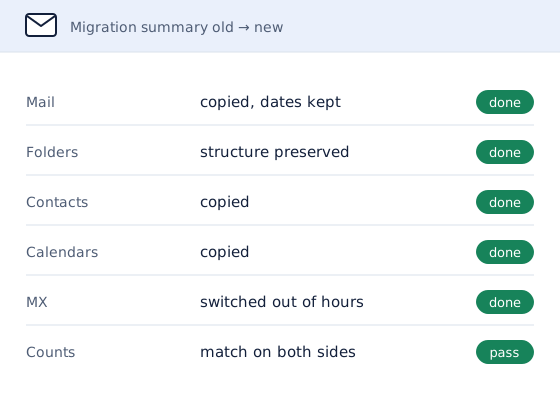
What Moves in a Microsoft 365 to Google Workspace Migration
- Mail, folders, drafts and attachments, with dates and read status
- Contacts, calendar events and tasks
- OneDrive files, and SharePoint files where the quote lists them, into Google Drive
- Aliases, shared mailboxes and forwarding rules, rebuilt on the Google side
Outlook rules and shared mailboxes do not travel with the mail, because rules and permissions stay behind on Microsoft 365. They are listed during the inventory and rebuilt in Google Workspace, so nothing the team relies on is left behind at the switchover.
How a Microsoft 365 to Google Workspace Migration Runs
- Inventory. Every Microsoft 365 mailbox is listed with its size, along with shared mailboxes, aliases, forwarding rules and any OneDrive or SharePoint files in scope.
- Prepare Google Workspace. Mailboxes are created and the domain is verified in Google Workspace, while mail keeps flowing to Microsoft 365 as normal.
- Copy the mail. Messages are copied with their folders, dates and read status. The copy can be repeated, so anything that arrives during the move is picked up in a final pass.
- Switch over. MX records are pointed at Google Workspace outside business hours, and SPF, DKIM and DMARC are updated to match.
- Verify and report. Message counts are compared mailbox by mailbox, and a completion report records what moved. Keeping the Microsoft 365 licenses for a month afterwards is recommended as a safety net.
Microsoft 365 to Google Workspace Migration and Email Authentication
When the MX records move, the domain's SPF record has to authorize Google Workspace, Google Workspace's DKIM key has to be published, and DMARC has to be set to match. Updating all three as part of the move means mail from the new mailboxes does not start landing in spam.
The checks before a move also find problems that were there all along. That is the same work covered by email deliverability services, done as part of the migration rather than after it.
Microsoft 365 to Google Workspace Migration Example: No Gap in Incoming Mail
Two mailboxes moved from Microsoft 365 to Google Workspace with full mail history, folders, drafts and attachments, plus calendar events, contacts and tasks. Mail delivery was cut over with no gap in incoming messages, and the old Microsoft 365 mailboxes stayed readable for reference.
The checks before the move found that the domain's SPF record had been saved without the opening v=spf1 tag, so every mail provider ignored it and the domain had no sender protection at all. Authentication was rebuilt as part of the move.
| Check | Before the move | After the move, the same day |
|---|---|---|
| Overall assessment | 2 of 10, high risk | 8 of 10, low risk |
| SPF | No valid record detected | Valid, Google Workspace authorized |
| DKIM | No signing key published | Signing key published |
| DMARC | None, no enforcement | Reject, enforced |
Microsoft 365 to Google Workspace Migration Example: Mail and Files
Three mailboxes came across from Microsoft 365 to Google Workspace with their email, contacts and calendars, along with the team's OneDrive files. Files stored in SharePoint were outside the original scope and had become hard for the team to reach, so they were moved into a shared Google Drive folder as well. The switchover ran outside business hours, and the Microsoft 365 licenses stayed active for a month afterwards as a safety net.
Migration to Google Workspace From Microsoft 365: In-House or Specialist
Google's own migration tools work for straightforward moves between the big platforms, but the DNS switchover and the authentication records are still the business's job. A specialist handles the inventory, the copy, the switchover and the per-mailbox checks, and ends with a completion report. Every move is quoted in writing before work starts, and nothing is charged without an agreed quote.
All migration routes, including Google Workspace to Microsoft 365 and moves from web-hosting email, are on the email migration services page. For choosing between the two platforms first, see Google Workspace vs Microsoft 365.
Microsoft 365 to Google Workspace Migration Questions
Do Outlook Rules Move in a Microsoft 365 to Google Workspace Migration?
Outlook rules do not move in a Microsoft 365 to Google Workspace migration, because rules and permissions do not travel with the mail. They are listed during the inventory at the start and rebuilt on the Google side, along with shared mailboxes, aliases and forwarding rules, so nothing the team relies on is missing when the switchover happens.
Can OneDrive and SharePoint Files Move to Google Drive?
OneDrive and SharePoint files can move to Google Drive as part of a Microsoft 365 to Google Workspace migration when the quote lists them. In one move, three mailboxes came across with the team's OneDrive files, and SharePoint files that had become hard to reach were moved into a shared Google Drive folder as well.
Is There a Gap in Incoming Mail When Moving to Google Workspace?
Moving to Google Workspace from Microsoft 365 leaves no gap in incoming mail. The MX records switch outside business hours, a final copy picks up anything that reached Microsoft 365 while DNS updated, and the old mailboxes stay readable. In one two-mailbox move, delivery was cut over with no gap in incoming messages.
How Long Does a Microsoft 365 to Google Workspace Migration Take?
A Microsoft 365 to Google Workspace migration for a small team is usually finished within a week, depending on the number of mailboxes and how much mail they hold. The switchover itself runs outside business hours, and the quote gives the timeline once the inventory of mailboxes, shared calendars and files is done.
Request a Microsoft 365 to Google Workspace Migration Quote
List how many mailboxes are moving and whether OneDrive or SharePoint files are included.
A written quote comes back by email, with the scope and the price set out before any work starts.
Prefer to talk it through? Book a call.